Practical Guide

SATAjet X 5500 Digital: clean spray pattern, reproducible results
This practical guide summarizes the most important application points of the SATAjet X 5500 Digital – compact, actionable and with reference values from the operating manual. Plus: clear purchase recommendation for typical application scenarios.
Product Overview
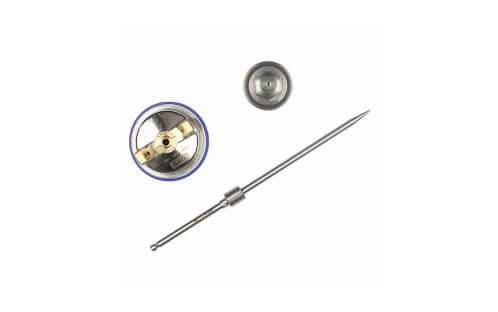
The X-nozzle technology with I- and O-nozzle geometries enables a very smooth, controlled spray pattern – matched to material and desired stroke guidance. The digital variant integrates a manometer for reproducible pressures at the gun inlet.
| Variant | Typical Applications | Advantages |
|---|---|---|
| X 5500 HVLP | Base/topcoats with focus on overspray reduction | Very high transfer rate, fine finish |
| X 5500 RP | Fast surface coverage, clear coats | High working speed, homogeneous spray pattern |
| X 5500 PHASER | Design edition (technically X 5500, special finish) | Exclusive design, same X-nozzle performance |
| X 5500 Digital | Processes with documentable pressures | Integrated manometer for reproducible results |
Consistency
Digital pressure
Read directly on the gun
Finish
Smooth spray pattern
X-nozzles in I/O geometry
Efficiency
Material saving
High transfer rates
Tip: Select the X-nozzle geometry to match the material flow: I-nozzles for a slim, directed spray pattern (precise edge guidance), O-nozzles for a fuller, softer spray pattern. Always spray a test panel.
Recommended basic settings (reference values)
Fine-tune according to the product data sheet of the paint manufacturer and booth conditions. Values serve as a starting point:
- RP, base/clear coat: Gun inlet pressure approx. 2.0 bar; nozzle 1.3–1.4; spray distance 15–20 cm
- HVLP, base: Gun inlet pressure in the lower range (typically < 2 bar); nozzle 1.3; distance 12–18 cm
- Material preparation: As per manufacturer’s specifications (viscosity) – sieve before filling
- Air cap: Clean and unobstructed – contamination changes spray pattern
Note: Pressure values refer to the gun inlet (digital display). Always test panel and check mist/texture if necessary.
Pro workflow (5 steps)
- Preparation: Degrease, blow off dust, check masking. Select viscosity and nozzle.
- Set pressure: Adjust gun inlet at digital manometer according to reference value/product data sheet.
- Test panel: Validate spray pattern, mist and stroke width. If necessary adjust material amount/stroke width.
- Application: Even coverage (50–70%), parallel stroke guidance, constant distance and angle.
- Control & drying: Check for dust inclusions/orange peel; observe flash-off and drying times.
Troubleshooting
Unstable spray pattern
- Adjust pressure slightly (±0.1–0.2 bar)
- Clean/mount air cap/nozzle correctly
- Select appropriate nozzle geometry (I/O)
Too much mist/overspray
- Reduce distance, stabilize stroke guidance
- Consider HVLP setup or slightly reduce pressure
- Check viscosity (too thin?)
Orange peel/texture
- Slightly increase material flow/optimize distance
- Moderately increase pressure (reference steps)
- Adjust drying/temperature and viscosity
Runs/sags
- Reduce material amount, maintain even speed
- Use smaller nozzle size or check I→O / O→I change
- Observe flash-off between coats
Maintenance (short & practical)
- Flush immediately after use; clean nozzle, air cap, needle
- Only use compatible cleaning agents, no aggressive brushes
- Check and replace seals/wear parts regularly
- Protect digital display from shocks/moisture
- Lightly oil all parts, store dry
FAQ
Which nozzle geometry should I choose?
I-nozzle for directed, precise strokes; O-nozzle for fuller, softer pattern. Test panel decides.
How do I use the digital display correctly?
Adjust and read pressure with trigger pulled. Document for each paint.
Can I switch between HVLP and RP?
Yes, depending on gun/nozzle set. Adjust settings and nozzle size to material.
What to do with a clogged nozzle?
Stop immediately, check sieving, clean nozzle/cap, don’t bend needles.
How do I achieve a high-gloss clear coat finish?
Constant stroke, sufficient material, correct distance, observe reference pressure – then fine-tune.
Configure and order now
Need advice? We’ll help with nozzle selection & settings.
All settings are reference values and depend on material/data sheet.